To check noindex, search the page source for the robots meta tag and also look at the X-Robots-Tag HTTP response header. The header never shows in the source, so use curl -I or the DevTools Network tab. Confirm that Google actually read it with Search Console's URL Inspection. If robots.txt blocks the URL, Google never sees the noindex at all.
Two Places noindex Can Live
| Where | Looks like | Visible in | Watch out |
|---|---|---|---|
| HTML meta tag | <meta name="robots" content="noindex"> | View Source, DevTools, checkers | Looking only at HTML misses a noindex sent in the header |
| HTTP response header (X-Robots-Tag) | X-Robots-Tag: noindex | curl -I, DevTools Network tab | Never appears in the page source. Also works on PDFs and images |
The rule that decides it: can Google read it? noindex only works once Google fetches the page, so check that it's written and that Google read it as separate questions. The robots meta tag belongs in <head>, but Google says it also respects one in <body> — unlike canonical, which Google only accepts in <head>.
What to Check, in Order: 5 Steps
1. Search the source for name="robots" and name="googlebot"
Open the page, view the source (Ctrl+U on Windows, Command+Option+U on Mac), and search for robots and googlebot. If content contains noindex or none, the page tells search engines to keep it out. none means the same as noindex, nofollow.
2. Check the X-Robots-Tag response header
Run the command below in a terminal. No output means no header-level noindex. A bot name in the value, like "X-Robots-Tag: googlebot: noindex", means it applies only to that bot. These usually come from server or CDN settings and never show in the page source.
3. Make sure robots.txt doesn't block the URL
If robots.txt blocks crawling, Google can't fetch the page, so it never sees the noindex. Google explains that such a page can still appear in results if other pages link to it. Don't block in robots.txt a URL whose noindex you want Google to read.
4. Use URL Inspection to see whether Google read it
Inspect the URL and open the Page indexing section. If Google read a noindex, it says indexing isn't allowed and where the noindex was found (robots meta tag or X-Robots-Tag). For the whole site, see "Excluded by 'noindex' tag" in the Page indexing report.
5. Run a checker for both the meta tag and the header
Direbase's SEO check warns below the score when it finds noindex in a meta tag (robots or googlebot) or in the X-Robots-Tag header. It isn't mixed into the score, because noindex keeps a page out of search no matter what else you fix. This warning doesn't check robots.txt blocking.
Step 1: find the meta tag in the HTML fetched as Googlebot
curl -s -A "Mozilla/5.0 (compatible; Googlebot/2.1; +http://www.google.com/bot.html)" https://example.com/page | grep -ioE '<meta[^>]*name="(robots|googlebot)"[^>]*>'Step 2: check the X-Robots-Tag header
curl -sI https://example.com/page | grep -i x-robots-tag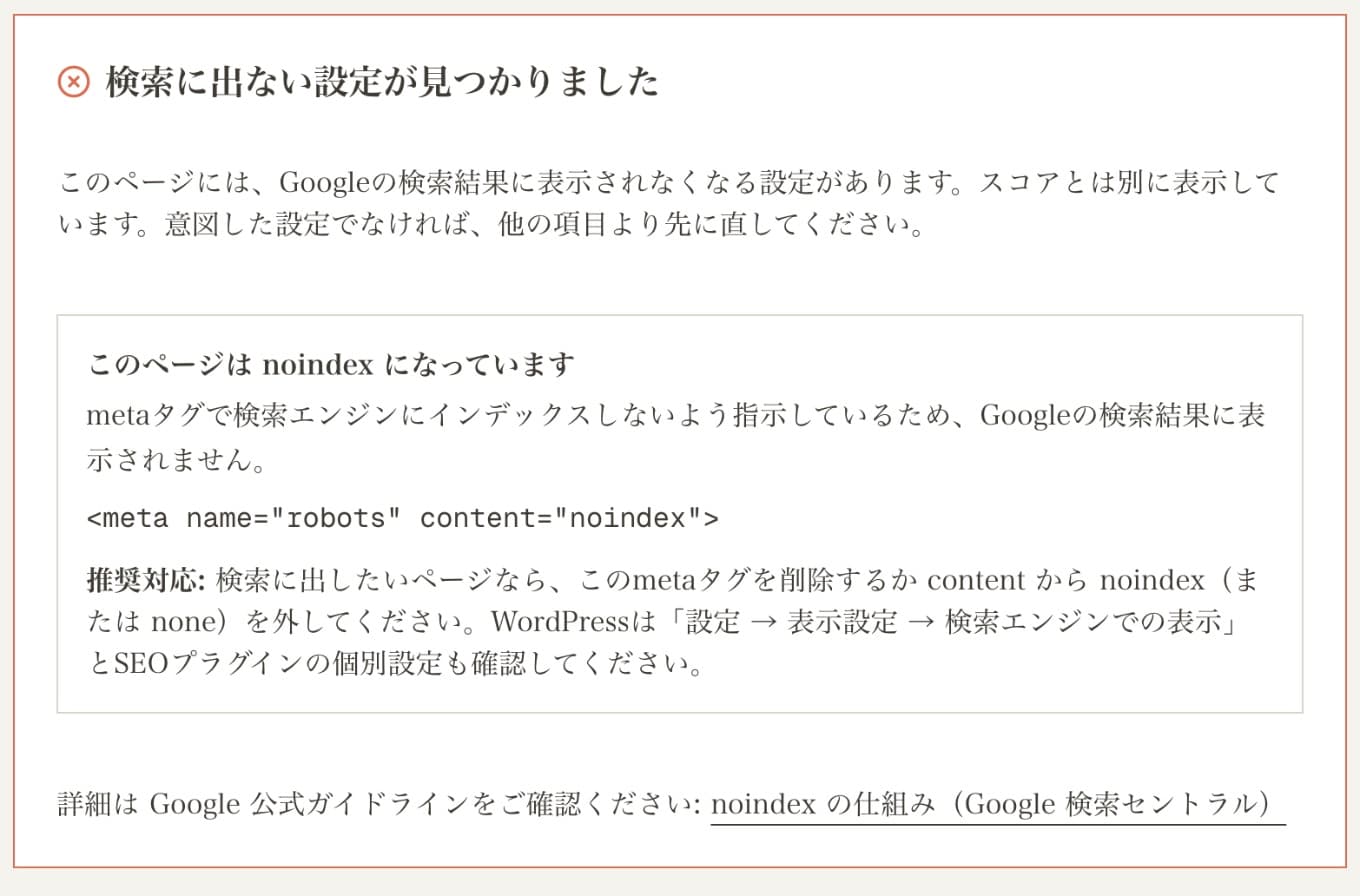
For the URL Inspection states (Discovered, Crawled, and so on), see Discovered – currently not indexed. For writing robots.txt, see how to write robots.txt.
Is noindex Even the Right Tool? Pick by Goal
On October 21, 2026, Google updated its "Control what you share with Google Search" page to list the robots meta tag, data-nosnippet, X-Robots-Tag, and the Search generative AI control side by side. The right tool depends on what you want to stop. Before checking noindex, make sure it fits the goal.
| Goal | Use | Common mistake |
|---|---|---|
| Keep a page out of search results | noindex (meta tag or X-Robots-Tag) | robots.txt Disallow — it only stops crawling and isn't an instruction to drop the page |
| Hide only the snippet | nosnippet or max-snippet; data-nosnippet for parts of a page | noindex — the whole page disappears |
| Manage use in AI Overviews and AI Mode | Search Console's generative AI control (site-wide) | noindex — it removes the page from regular results too |
| Keep images or videos out of search | Block crawling in robots.txt (Google only indexes media it can crawl) | Page-level noindex — an image used elsewhere can still show |
| Keep it from everyone | Password protection or deleting the page | noindex — anyone with the URL can still open it |
| Remove a result that's already showing, fast | Search Console Removals tool (temporary) plus noindex | noindex alone — a recrawl can take months |
Blocking individual AI crawlers (GPTBot, ClaudeBot, and others) is separate from Google's settings — see how to check whether you're blocking AI crawlers.
Measured: How Google Treated This Site's noindex Pages
On October 26, 2026, we checked four kinds of pages on this site that don't need to be in search, using the source and Search Console's URL Inspection. Same noindex, but whether Google had read it varied.
| Page | Setting | URL Inspection | Call |
|---|---|---|---|
| Sign-up page | meta noindex | Excluded by 'noindex' tag (last crawled 2026-08-23) | As intended. Leave it |
| Login page | meta noindex | Discovered – currently not indexed (never crawled) | Not read yet, but not in search either. Leave it |
| Dashboard | meta noindex, nofollow + robots.txt Disallow | URL is unknown to Google | A combo where noindex can't be read. Fine for now; remove the Disallow if "Indexed, though blocked" appears |
| Shared audit results | meta noindex, follow (since 2026-10-23) | — | Not blocked in robots.txt, so the noindex can be read. OGP kept for social previews |
Two takeaways. First, writing noindex does nothing until Google fetches the page. The login page is still at Discovered and has never been crawled, so its noindex hasn't been read — and since it isn't in search, that's fine. If you need a page gone quickly, though, don't rely on noindex alone; use the Removals tool too.
Second, pages like the dashboard that are both blocked in robots.txt and set to noindex. By Google's own explanation, that noindex is never read. It's harmless now because Google doesn't know the URL, but if outside links make the bare URL appear in search, removing the Disallow so Google can read the noindex is the surer fix. When we took shared results out of search on October 23, 2026, this is why we used noindex only and didn't block them in robots.txt.
Common Causes of an Unintended noindex
- Staging settings left in place after launch — and if they're in a header, the source won't show them
- WordPress's Settings → Reading → Search engine visibility box still checked, or a per-post setting in an SEO plugin
- An X-Robots-Tag set in a CDN or hosting dashboard for preview domains that also applies to the live domain
- Adding or removing noindex with JavaScript. Google doesn't guarantee rendering, so treat the original HTML as the truth
noindex is one meta tag among several. To check title, canonical, OGP, and the rest together, see how to check meta tags.
Related Tools
Sources (checked October 26, 2026)
- Google Search Central — Block Search indexing with noindex
- Google Search Central — Robots meta tag, data-nosnippet, and X-Robots-Tag (body tags respected)
- Google Search Central — Control what you share with Google Search (updated 2026-10-21)
- Google Search Central — Documentation updates
- Search Console Help — URL Inspection tool
- Search Console Help — Page indexing report
FAQ
What's the quickest way to check noindex?▾
Is a robots.txt Disallow the same as noindex?▾
I removed noindex, but the page still isn't in search.▾
Does a noindex meta tag in <body> still work?▾
Should I add nofollow along with noindex?▾
If I only want to stay out of AI Overviews or AI Mode, should I use noindex?▾
Check Meta and Header noindex in One Pass
Enter a URL and any noindex shows up as a warning under the score — including X-Robots-Tag, which the source never shows. If there's none, you get the other fixes in order of points.
Run the SEO check
Written by
今井政和SEO Director / Frontend Developer
SEO Director with 20+ years of web industry experience. Creator of Direbase and the official WordPress plugin "ORECTIC SEO CHECK." Author of a book on web strategy inspired by Edo-era merchant principles.
@imai_directorRelated Articles
New Domain Search Performance Analysis | Diagnosing the 17K Impressions vs 42 Clicks Gap
Perfect technical setup, yet only 42 clicks. A cross-tool diagnostic using GA4, Direbase, and GSC to unpack the impression/click gap on a new domain.
Don't Be Fooled by AI Search Stats | Examining the I/O 2026 Hype at Source
A principal-level report tracing the sensational numbers around AI search back to their sources — the causation caveat behind +35%, the real range of CTR drops, and the GSC anonymization trap — to build a judgment that isn't fooled by stats.
What to Check for AI Overview Optimization | AIO Citation Conditions & SEO Audit Items
AIO citation conditions and audit items verified through 300K-URL analyses and external data. Structured data 3x implementation rate, E-E-A-T, and content clarity are top citation predictors. SEO check items for the AIO era.
Discovered – Currently Not Indexed: What to Check When New Pages Aren't Crawled
Google found the URL but postponed the crawl. How to tell three similar states apart and check your sitemap, link paths, and indexing requests, using a real case where new articles went two weeks uncrawled.